

1. Introduction
The addresses used for communication over networks are called Internet Protocol addresses (IP). Each address consists of 4 decimal numbers separated by a dot for human readability, each ranging from 0 to 255. Every device connecting to a network will be assigned to an IP which then can be used by others to communicate with this device.
The addresses used for communication over networks are called Internet Protocol addresses (IP). Each address consists of 4 decimal numbers ranging from 0 to 25 and separated by a dot for human readability. Every device connecting to a network will be assigned to an IP which can be then used by others to communicate with this device.
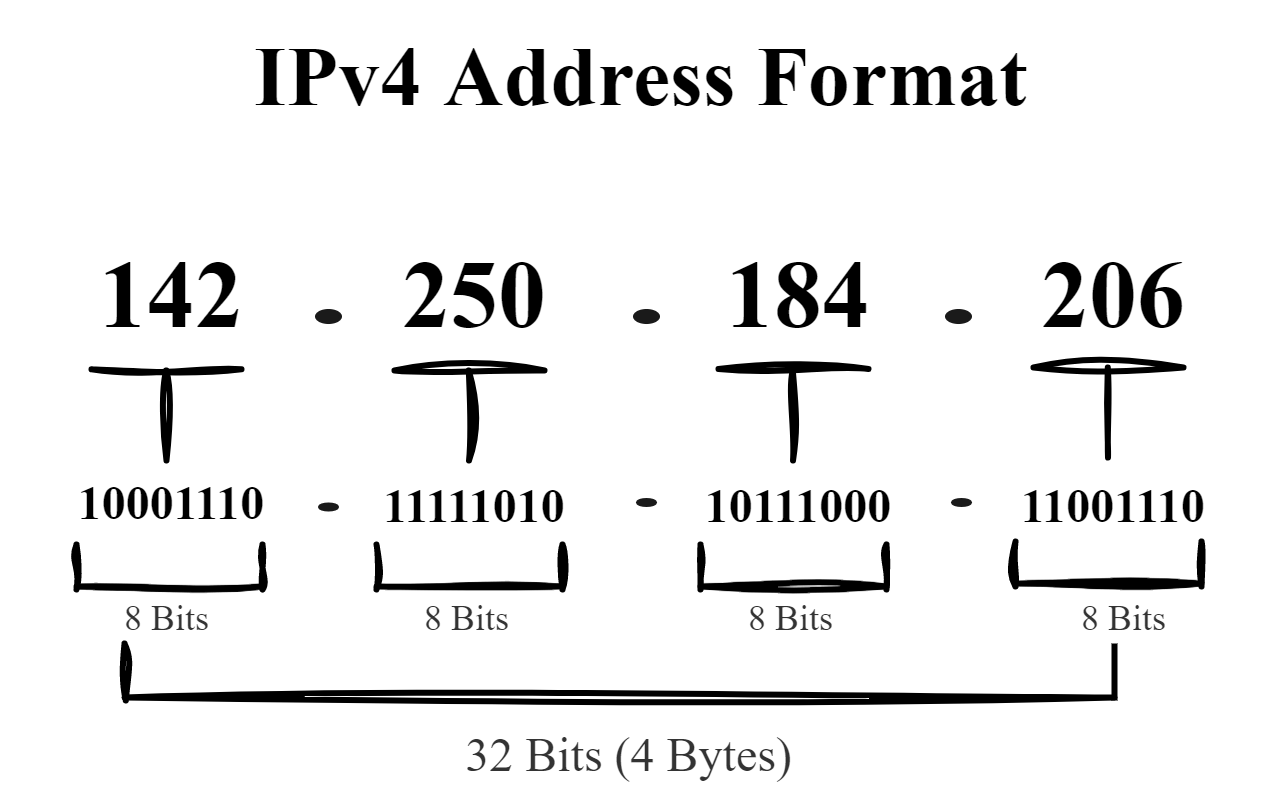
However, the problem for the majority among us humans is the difficulty of remembering the IP's of all websites we want to visit. Some website's IPs may even change every day. However it could be much easier to remember names instead. To overcome this problem we need some kind of database, where each IP is mapped to a unique name (domain), that can be then used to reference the website.
We can think of this database as an address book. Names being the website domains and numbers being the IP addresses. This database is called the Domain Name System (DNS). I find the definition mentioned by Tanenbaum in his brilliant book [1, p. 612] very precise and straightforward:
We'll be discussing the characteristics of the DNS database to understand how does it exactly work. Beginning with the hierarchical character, the domain-based mapping to IPs and lastly how and why the database is distributed.
Please note that many domains we'll be using in the examples are ficitonal and doesn't realy exist.
2. The DNS Name Space
As we mentioned earlier, IPs may change constantly and the number of machines connecting to the Internet is getting larger, which means more IPs to be managed. So some kind of system is needed to keep track of all mapping records. The system used for managing the domains is similar to postal system. Having Countries at the top of the hierachy, followed by state or province, the city, and lastly street address and house number.
Similarly, we have at the top of the DNS name space the so called Top Level Domains (TLD). TLDs can be mainly categorized into country-coded domains '.us', '.de', '.sy' or generic domains '.com', '.net', '.org'. The ICANN (Internet Corporation for Assigned Names and Numbers) was created in 1998 for manageing the top of the naming hierachy / TLDs. Each top-level-domain is partionned into subdomains which can be further partitioned and so on. The following figure shows a hierarchical representation of domains as a tree.

The ICANN appoints registrars for the top level domains. For getting a second level domain, say 'thu.de', we need to ask the '.de' registrar whether the domain is available. If so, we can pay the registrar a small annual fee to get the domain name. After that we are responsible for managing all subdomains of 'thu.de' and for assigning subdomains. So if someone wants to get a subdomain of'thu.de' say 'cs.thu.de', they'll need our permission first.
Did You Know ?
Cybersquatting: Back to the days where the internet was still reviving and many big companies
haven't obtained their trademark domains yet, some would buy and reserve these domains and
sell them later for a much higher price to the interested party.
3. The DNS Servers
Another important characteristic of the DNS Database is distribution. In theory we can save this address book we mentioned earlier on one server, which will be responsible for answering all queries. In practice this Server would be overloaded, not to mention what would happen to the internet if this server goes down (Single Point of Failure). Instead the DNS Space is divided into non-overlapping Zones. Each zone has at least one name server, which holds the database of that zone.
The following figure shows how the DNS name space from earlier [Figure 2] can be divided into zones.

A Zone boundary depends on several factors, such as how many servers are required for the zone and at what locations. At the end its up to the zones administrator. For example the technical university of ulm (THU) may has its own zone that handles the business administration domain 'ba.thu.de' but not the computer science faculty 'cs.thu.de'. This may want to adminstrate their own zone.
So how does a DNS Query work ?
To demonstrate this process let's assume that our computer want to finds the ip address of 'networks.cs.thu.de' and there is no chached information about the domain available locally:
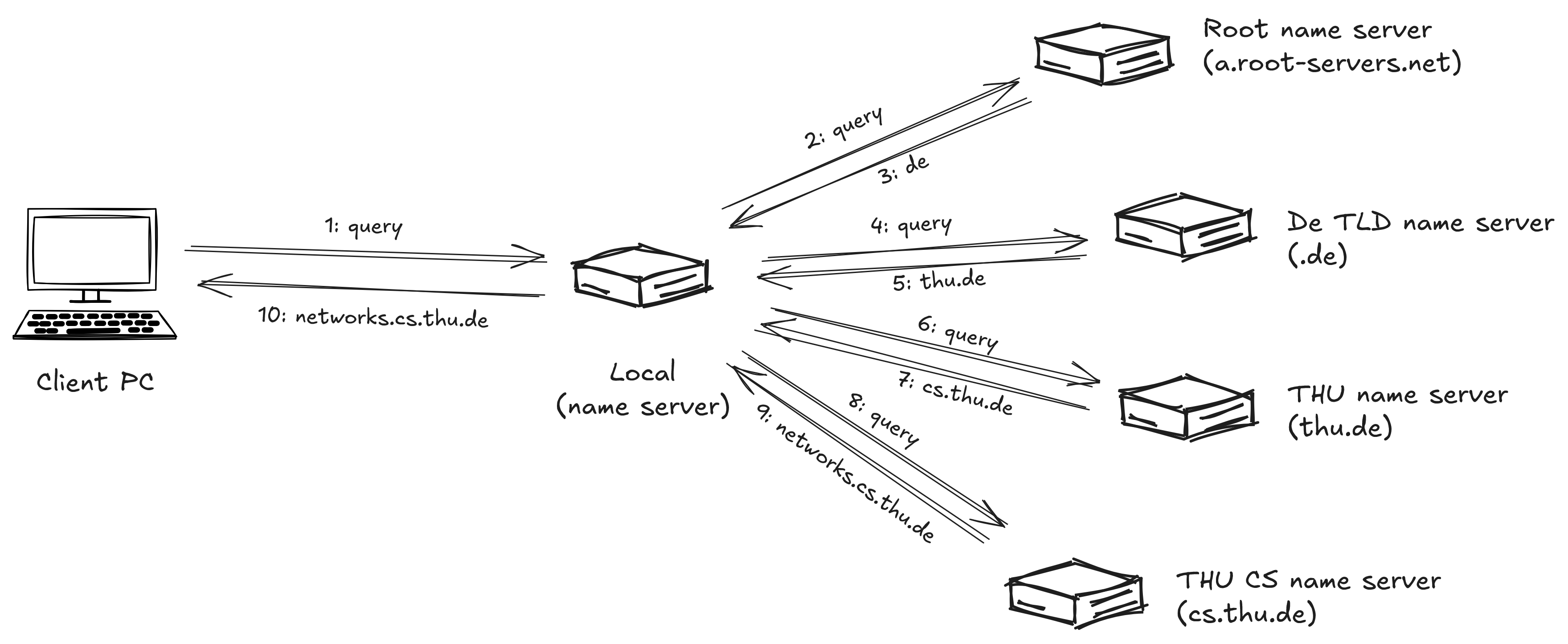
- Step 1: A query is sent by our computer to the local name server. The query contains the sought domain name 'networks.cs.thu.de', the type (A) and the class (IN). (More Information about the type and classes can be found in the next chapter.)
- Step 2 + 3: The local domain server will start with the top of the name hierachy. In our case the so called root name server 'a.root-servers.net' will be queried for geting the IP for the '.de' TLD name server. There are 13 root (authoritative) servers](https://www.iana.org/domains/root/servers) (a.root-servers.net - m.root-servers.net). A list of these servers is normally saved in every system and loaded into the DNS cache when the local DNS Server is started. Root servers doesn't know where 'networks.cs.thu.de' is located at and what its adress is. However it must know what is the address of the 'de' TLD name server, which is returned in step 3.
- Step 4 + 5: Afterwards the local server continues by sending a query to the 'de' TLD name server. Which returns the name server for 'thu'. This is shown in steps 4 and 5.
- Step 6 + 7: The local name server sends the query to the thu name server in step 6. Now if we were looking for the 'ba.thu.de' domain the answer would be found, as the THU zone includes the BA facultiy. But science that the computer science faculty has its own name server, the thu name server would return the address of the computer science faculty name server in step 7.
- Step 8 + 9: Finally, the local name server queries the **authoritative** THU CS name server (step 8), which must have the answer. This returns the final answer in step 9 to the local name server.
- Step 10: The local name server returns the IP address of the queried domain to the DNS resolver (e.g. Browser).
The local DNS name server in our example is called recursive DNS Server. It handels the resolution on behalf of the browser. It goes from one name server to the other until it has the final answer. Authoritative Servers are the ones that hold and manage domains in their zones and thus they are always correct. The example shown above is the worst case scenario. Normally all of the answers, including all the partial ones are cached, in this way if another Computer in our Network sends a query for resolving 'networks.cs.thu.de' to the local name server, the answer will already be known. Even better if a DNS query for a different host in the same name space e.g.'robotics.cs.thu.de', the local name server can send the query directly to the authoritative name server 'cs.thu.de'. This applies for domains higher in the name space, for example 'ard.de'. Caching helps reducing resolving times and improves performance.
4. Domain Resource Records
When a Resolver queries a DNS Server to resovle a domain name, what the resolver actually gets are the so called resource records of this domain. The reource records are part of the DNS Database. Every domain can have can have a set of resource records.
A resource record is simply a 5 tuple:
- Domain Name:Domains may have several resource records belonging to it. The Domain Name can be seen as the primary key of a resource record. It indicates the domain name to which the record applies.
- Time To Live:Indicates how stable a record is, highly stable records have high values for example 86400s (1 day). Less table records have lower values for example 60s. This information is mainly used for DNS Caching.
- Class: This value is 'IN' for internet informations. Other codes may be use for other types of information. But we wont see any other codes in this article.
- Type: This field is used to tell the type of the record. The following table shows the most important ones.
- Value: Holds the actual value of the resource record.
The most important records types are:
| Type | Meaning | Value |
|---|---|---|
| SOA | Start of Authority | Zone Parameters(Primary NS, serial) |
| A | IPv4 | 32-Bit Integer |
| AAA | IPv6 | 64-Bit Integer |
| MX | Mail Exchanger | Priority, Mail Server Domain |
| NS | Name Server | Name of the server for this domain |
| TXT | Test | Arbitary ASCII text data |
We can use the dig tool which is shipped
with the bind package to query
'google.com' resource records types: dig google.com any
| DomainName | TTL | Class | Type | Value |
|---|---|---|---|---|
| google.com. | 60 | IN | SOA | ns1.google.com. dns-admin.google.com. 825979782 900 900 1800 60 |
| google.com. | 300 | IN | A | 142.251.209.142 |
| google.com. | 300 | IN | AAAA | 2a00:1450:4005:801::200e |
| google.com. | 300 | IN | MX | 10 smtp.google.com |
| google.com. | 3600 | IN | TXT | "google-site-verification=wD8N7i1JTNTkezJ49swvWW48f8-0Hf5o" |
The most important record type for us the A. Thanks to this record we are
able now to address and communicate the server which hosts google.com. If
you want to have a more detailed information about the record types, you may have a look
at [1, pp. 616-619].
5. Conclusion
So in this article we've had a look on the problem, the DNS solves and how a DNS resolver sends a query to a recursive DNS Server, which in turn tries to get the resource records for the requested domain by asking all responsible servers in the look-up-chain (worst case), beginning with the root server until the authoritative one. In the next article we will take a closer look how Linux systems resolve DNS Queries and how can we set up a DNS cache for our local resolver.
6. References
- A. S. Tanenbaum and D. Wetherall, Computer Networks, 5th ed. Upper Saddle River, NJ, USA: Pearson, 2011.
- Domain Name System Overview - Linux-IP