

1. Introduction
After we've studied, what DNS resolving is and how does it work, we'll be looking closer in this article on the way used in Linux distributions for resolving domain names, where the weaknesses lie and how to improve the resolving process and make it more efficient.
2. The GNU C Lib Resolver
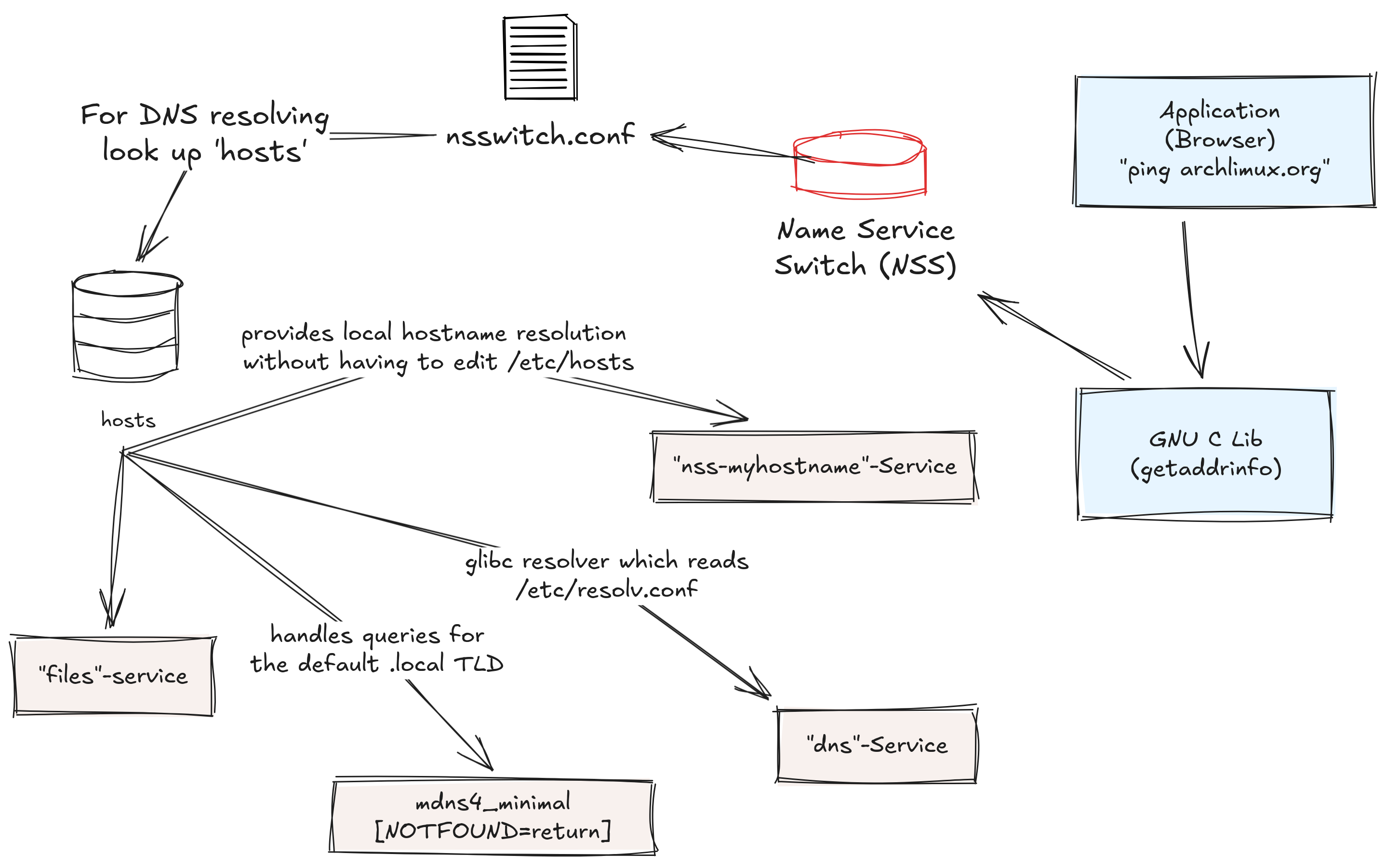
Many applications in Linux use the GNU C Library's getaddrinfo-API,
for resolving IP-Addresses. This API uses on the other hand the so called Name
Service Switch (NSS) at /etc/nsswitch.conf.
The NSS is basically a map of databases and their corresponding services, which can be queried to get the corresponding database entries. NSS goal was to centralize the place, different applications get their data from, and to prevent applications from having their own static databases.
The Database responsible for resolving domain names is the hosts-Database:
Here is an example for the hosts entry taken from /etc/nsswitch.conf :
There are two services defined here for the hosts database:
files: reads the /etc/hosts file. It is usually used for hosts on the local network.
dns: is the glibc resolver which reads /etc/resolv.conf.
Here is an example for the /etc/resolv.conf file generated by
the NetworkManager:
search fritz.box
nameserver 192.168.178.1
nameserver fd17:625c:f037:2::3
The name server used for queries here is the router (192.168.178.1), which acts as forwarder.
We can use the dnslookup utility to check which server is being queried for resolving a domain:
dnslookup google.com output:
dnslookup masterServer: 192.168.178.1:53
dnslookup result (elapsed 17.805328ms):
;; opcode: QUERY, status: NOERROR, id: 11113
;; flags: qr rd ra; QUERY: 1, ANSWER: 1, AUTHORITY: 0, ADDITIONAL: 0
;; QUESTION SECTION:
;google.com. IN A
;; ANSWER SECTION:
google.com. 146 IN A 142.250.186.46
Notice that the answer section contains a DNS Resource Record Typ A, with 146 seconds time to live and google's server IPv4 address 142.250.186.46
We can add the Cloudflare DNS Server IP 1.1.1.1 to /etc/resolv.conf
search fritz.box
nameserver 1.1.1.1 # add Cloudflare DNS server's IP
nameserver 192.168.178.1
nameserver fd17:625c:f037:2::3
and test the lookup again:
dnslookup google.com output:
dnslookup masterServer: 1.1.1.1:53
dnslookup result (elapsed 16.191517ms):
;; opcode: QUERY, status: NOERROR, id: 40977
;; flags: qr rd ra; QUERY: 1, ANSWER: 1, AUTHORITY: 0, ADDITIONAL: 0
;; QUESTION SECTION:
;google.com. IN A
;; ANSWER SECTION:
google.com. 124 IN A 142.250.185.110
Prevent unsafe resolving of local hostname over the network
The NSS service myhostname is provided by systemd and enabled by default in /etc/nsswitch.conf and its used for resolving
local hostname and localhost locally. However some programs may read /etc/hosts and/or /etc/resolv.conf directly, bypassing the NSS [2]. This behaivor may lead to resolve
the local hostname over the network. To prevent such potential security risks, add the following lines
to your /etc/hosts file:
# See hosts(5) for details.
127.0.0.1 localhost
::1 localhost
# The following lines are desirable for IPv6 capable hosts
::1 ip6-localhost ip6-loopback
fe00::0 ip6-localnet
ff00::0 ip6-mcastprefix
ff02::1 ip6-allnodes
ff02::2 ip6-allrouters
ff02::3 ip6-allhostsA
The built in glibc-Resolver has some limitations. For example it doesn't cache lookups, meaning more lookup time and it doesn't support secure DNS (DNSEC) to prevent DNS cache poisoning. Therefore in the following chapter we'll setup a DNS cache and make some tests to see the difference. As for secure DNS, since it's a bigger topic, we'll be discussing it in a spearate article.
3. DNS Cache
In last chapter, we've took a look at how domain names are resolved and we've seen that there multiple DNS resolvers involved (stub-, recursive- and forwarding-resolvers). The ones we are interested in are stub-resolvers. These are local DNS resolvers that can take care of the entire resolving process for us, like forwarding queries to forwarder and/or recursive resolvers, DNS caching on the local network, validating DNS records and more.
Setting up a local DNS Cache
I'll be using systemd-resolved as a Stub-Resolver because of its simplicity and since its already included within the systemd package by default. You can find a detailed comparision of different DNS servers on Wikipedia.
sudo pacman -Sy systemd-resolved
 sudo systemctl enable systemd-resolved.service
 sudo systemctl start --now systemd-resolved.service
To use the local stub resolver which listens on port 53 of 127.0.0.53, create symbolic link
from /etc/resolve.conf to /run/systemd/resolve/stub-resolv.conf
ln -sf ../run/systemd/resolve/stub-resolv.conf /etc/resolv.conf Confirm that the service is enabled and running
sudo systemctl status systemd-resolved Make sure to enable the systemd-resolved NSS module
(nss-resolve)
by adding the entry resolve [!UNAVAIL=return] into the hosts NSS database:
Notice adding the resolve module before files module,
since systemd-resolved supports /etc/hosts internally, but with caching.
If you'll be using a client (e.g. DHCP or VPN), its advised to install systemd-resolvconf which provides the symbolic link /usr/bin/resolvconf which is used by these clients.
sudo pacman -S systemd-resolvoconf The systemd-resolved lookup utility
The system-resolved package provides a built-in lookup utility resolvectl, which can be used for querying DNS servers:
resolvectl query google.com output:
| google.com: | 142.251.36.174 | -- link: enp0s3 |
| 2a00:1450:4016:80b::200e | -- link: enp0s3 |
-- Information acquired via protocol DNS in 20.5ms.
-- Data is authenticated: no; Data was acquired via local or encrypted transport: no
-- Data from: network
To check which DNS server is used by systemd-resolved stub resolver:
resolvectl status output:
GlobalProtocols: +LLMNR +mDNS -DNSOverTLS DNSSEC=no/unsupported
resolv.conf mode: stub
Fallback DNS Servers: 9.9.9.9#dns.quad9.net 2620:fe::9#dns.quad9.net 1.1.1.1#cloudflare-dns.com
2606:4700:4700::1111#cloudflare-dns.com 8.8.8.8#dns.google 2001:4860:4860::8888#dns.google
Link 2 (enp0s3)
Current Scopes: DNS LLMNR/IPv4 LLMNR/IPv6 mDNS/IPv4 mDNS/IPv6
Protocols: +DefaultRoute +LLMNR +mDNS -DNSOverTLS DNSSEC=no/unsupported
DNS Servers: 192.168.178.1 fd17:625c:f037:2::3
DNS Domain: fritz.box
Default Route: yes
We can see that the stub server is used. This will uses the router on 92.168.178.1 as a forwarder resolver.
Activating systemd-resolved caching
systemd-resolved DNS caching is avtivated by
default. However you can confirm it by looking
in /etc/systemd/resolved.conf
cat resolved.conf | grep Cache you should see something like:
#Cache=yeseven though the line is commented, the file lists the default configurations.
You can override those by uncommenting the desired configuration and setting
its new value. To test the performance without caching we'll deactivate the
cache by setting Cache=no in /etc/systemd/resolved.conf
Don't forget to restart the service after changing the configurations
sudo systemctl restart systemd-resolved.service Lets' clear the cache, make a couple of queries and list the statistics:
# empty the cache
 sudo resolvectl flush-caches

 resolvectl query google.com
 resolvectl query google.com

 # show cache information
 sudo resolvectl statistics | grep Cache
output:
| Cache | ||
| Current Cache Size: | 0 | |
| Cache Hits: | 0 | |
| Cache Misses: | 47 |
We can see that we're getting only cache misses.
Now let's acitvate the cache and try again. But this time let's first send only one query, print the statistics, and afterward send a second query immediately (hence TTL) and print the statics again.
# empty the cache
 sudo resolvectl flush-caches

 # first query
 resolvectl query google.com

 # show cache information
 sudo resolvectl statistics | grep Cache

 # second query
 resolvectl query google.com

 # show cache information
 sudo resolvectl statistics | grep Cache
statistics after the first query:
| Cache | ||
| Current Cache Size: | 2 | |
| Cache Hits: | 0 | |
| Cache Misses: | 2 |
statistics after the second query:
| Cache | ||
| Current Cache Size: | 4 | |
| Cache Hits: | 2 | |
| Cache Misses: | 2 |
in the first statistics output, it's obvious, that no cache hits were achieved. However the query was cached, cache size is 2 (google's IPv4 and IPv6). In the seond output however, we can see that we have 2 cache hits.
We can measure how long a DNS lookup takes time, first empty the cache:
sudo resolvectl flush-cachesMake sure to execute the query multiple times immediately:
resolvectl query mjarkas.de google.com: 2a00:1450:4001:81c::200e -- link: enp0s3142.250.186.142 -- link: enp0s3
-- Information acquired via protocol DNS in 24.6ms.
-- Data is authenticated: no; Data was acquired via local or encrypted transport: no
-- Data from: network
resolvectl query google.com 0.00s user 0.01s system 32% cpu 0.038 total resolvectl query mjarkas.de google.com: 2a00:1450:4001:81c::200e -- link: enp0s3
142.250.186.142 -- link: enp0s3
-- Information acquired via protocol DNS in 1.4ms.
-- Data is authenticated: no; Data was acquired via local or encrypted transport: no
-- Data from: cache
resolvectl query google.com 0.00s user 0.01s system 71% cpu 0.017 total
It's obvious that the second query took only 1.4ms after caching, whereas the first query needed about 24ms. Also notice that resolvectl actually tells us where it gets the data from, in this the second query, it came from the cache.
4. Conclusion
We've had a deeper Look on how the majority of Linux applications make use of the GNU C Libary's API for resolving Domain Names. We've also introduced the limitation of this API in terms of caching. To overcome this limitations and improve efficienty we've installed a local DNS stub resolver for caching DNS queries.
In the third and last article on DNS topic, we'll have a closer look on DNS Security and Privacy. How DNS cache can be manipulated and how to protect ourselves against DNS Cache poisoning.
5. References
- A. S. Tanenbaum and D. Wetherall, Computer Networks, 5th ed. Upper Saddle River, NJ, USA: Pearson, 2011.
- Local Hostname is reolved over the network - Arch Wiki
- Systemd Resolved - Arch Wiki
- How Linux DNS Lookup works - StackExchange
- Anatomy of a linux DNS Lookup - Zwischenzugs